Benefits and Features

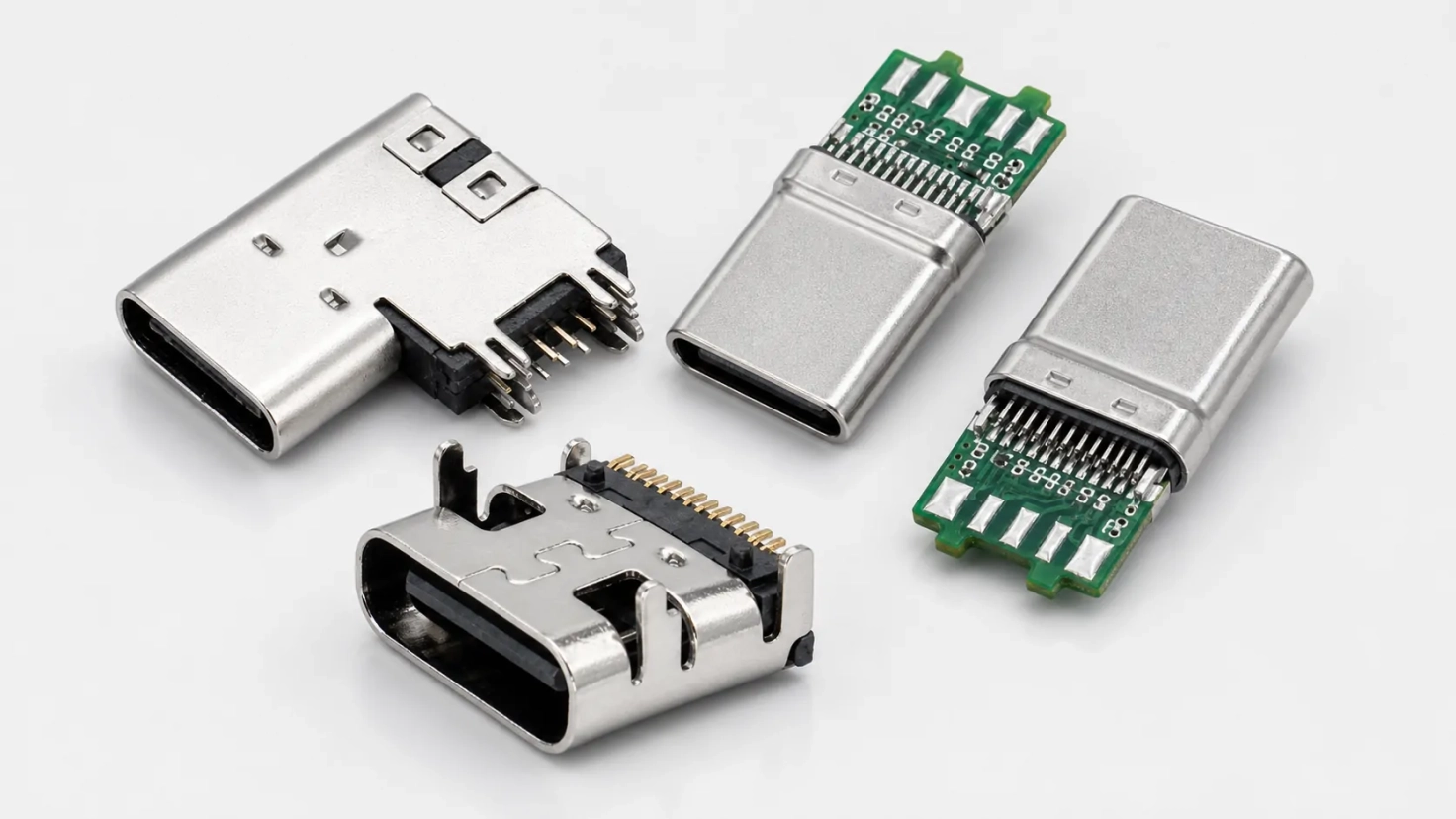
USB Type-C Connectors

Choose the Right Configuration

Pick the Function You Need

Choose from 6-, 16-, and 24-position configurations for charging, USB 2.0 data, or high-speed applications. Full-featured models can carry data, power, and optional audio/video through one port when supported by the complete system.

Fit the Connector to Your PCB

Top-mount, mid-mount, vertical, and flag-mount styles are available for different PCB layouts. Check the selected model’s drawing to confirm its footprint, height, orientation, and mounting details.

01

Match Performance to Your System

From Charging to High-Speed Data

Options range from power-only receptacles to full-featured data-and-power connectors. Select the model according to the data speed and power required by your application.

Check Compatibility Before Finalizing

Different models may be designed for USB 2.0, USB 3.2, or USB4 systems. Actual speed, backward compatibility, and adapter operation also depend on the host, device, controller, cable, and complete system.

02

Keep the Connection Stable

Reduce Interference and Improve PCB Retention

Shielded shells help reduce electromagnetic interference, while mechanical retention features keep the connector securely attached to the PCB. The exact design varies by model.

Choose the Right Environmental Protection

Splash-resistant and sealed configurations may be available for applications exposed to moisture or other environmental conditions. Confirm the IP rating, operating temperature, and durability of the selected model.

03

Move Easily from Selection to Production

Balance Cost, Quality, and Delivery

Integrated connector development and manufacturing help align product design, quality control, cost, and production requirements. Pricing and lead time depend on the selected model and order quantity.

Get Support with Drawings and Samples

Engineering support is available for product selection, technical drawings, samples, and application-specific requirements. Providing your PCB layout, performance targets, and expected order volume helps speed up the evaluation process.

04

WLconnectivity's USB Type-C Connectors

USB Type-C Connector Selection Guide

Product Type

Intended Function

Data Capability

Key Selection Notes

Power-Only / Charge-Only

Power or charging without USB data transfer

No data

Confirm pin assignment, rated current, rated voltage, and system-level charging requirements

USB 2.0 Data + Power

Basic USB data transmission and power

Up to 480 Mbps for verified USB 2.0 designs

Confirm implemented contacts, PCB footprint, electrical ratings, and complete-system compatibility

Full-Featured High-Speed

High-speed data and power with optional system-level alternate modes

Depends on the selected connector and complete system

Confirm target data rate, signal-integrity performance, pin assignment, PCB design, and electrical ratings

Need Help Choosing the Right Connector?

Our engineering team can recommend the best connector type for your application. Free consultation, no obligation.
Contact Engineering

How to Specify a Connector

01

Define Electrical and Performance Requirements

Start by confirming whether the application requires power-only operation, USB 2.0 data, or a qualified high-speed interface. Specify the target data rate, alternate-mode requirements, operating current, voltage, thermal conditions, and any system-level USB Power Delivery requirements.
02

Select the Connector Configuration

Choose between a plug and receptacle configuration. Define the required signals, contact assignment, and any application-specific pinout requirements to ensure the connector matches the intended circuit function.
03

Confirm PCB and Mechanical Compatibility

Specify the desired PCB position, mounting orientation, and termination method. Review the PCB thickness, connector stack height, footprint, keep-out area, and retention features to ensure correct mechanical integration.
04

Review Environmental and Project Requirements

Define the required shielding, sealing, operating temperature, durability, and compliance conditions. Provide available drawings, sample requirements, expected order volume, and other project information needed for technical evaluation.

Frequently Asked Questions

No. USB Type-C identifies the connector interface, not a guaranteed protocol or speed. The supported data rate depends on the selected connector, implemented contacts, PCB design, controller, cable, and complete system.

Contact Us Today

Looking for technical support, a product catalog, or a quotation from WLconnectivity (Wanlian)? Complete the form below, and our team will get back to you promptly.

For more information on our privacy practice, and how we are commited to protecting and respecting your privacy, please review our Privacy Policy

Get In Touch

  • Room 106, No. 6 Xixing Street, Chang'an Town, Dongguan City, Guangdong Province
  • [email protected]
  • Whatsapp:+86 13711955863

Subscribe to Our Newsletter

Get the latest updates on our products, industry news, and exclusive offers delivered straight to your inbox.

Copyright ©️ 2026,WLconnectivity . All Rights Reserved.